Domain Enumeration
In order to obtain information about our target domain we need to enumerate it. There are several ways to enumerate the domain with some kali tools, but in this section we are going to use PowerShell and the .NET framework.
- Domain Class:
- PowerView.ps1: https://github.com/PowerShellMafia/PowerSploit/blob/master/Recon/PowerView.ps1
- ADModule: https://docs.microsoft.com/en-us/powershell/module/activedirectory/?view=windowsserver2022-ps
- SharpView: https://github.com/tevora-threat/SharpView
- ADSearch: https://github.com/tomcarver16/ADSearch
Powerview on Linux
There are some alternatives based on linux systems.
First we need to obtain a TGT, to do that task we can use impacket-getTGT.
Use klist to get the info about the ticket.
We can save the ticket on a variable or we can specify it on each command:
Note: pywerview needs the FULL hostname in SPN to work properly.
export KRB5CCNAME=example.ccache
ython3 pywerview.py get-netcomputer -t srv-ad.contoso.com -u stormtroopers -k

KRB5CCNAME=example.ccache python3 pywerview.py get-netcomputer -t srv-ad -u stormtroopers -k
Importing the module
- PowerView:
First of all the module needs to be imported. Normally is not detected by AV, in case of detection, AMSI will need be evaded.
- ADModule:
Its important to import first a .dll file if RSAT is not installed on the machine.
Import-Module .\Microsoft.ActiveDirectory.Management.dll
Import-Module .\ActiveDirectory\ActiveDirectory.psd1
Current Domain
- PowerShell:
Identify current user domain
Identify current computer domain-
PowerView:
-
PowerView (dev):
-
ADModule:
Another Domain
-
PowerView:
-
PowerView (dev):
-
ADModule:
Domain SID
-
PowerView:
-
ADModule: We can find the SID inside the
Get-ADDomainoutput.
Domain Policy
- PowerView:
- PowerView (dev):
Domain Controllers
-
PowerView:
-
PowerView (dev):
-
ADModule:
Users & their Properties / Attributes
-
PowerView:
-
PowerView (dev):
-
ADModule:
Get-ADUser -Filter * -Properties *
Get-ADUser -Server corp.local -Filter * -Properties *
Get-ADUser -Identity <username> -Properties *
Get-ADUser -Filter * -Properties * | select -First 1 | Get-Member -MemberType *Property | select Name
Get-ADUser -Filter * -Properties * | select name,@{expression={[datetime]::fromFileTime($_.pwdlastset)}}
Note: Some sysadmins paste the password on the description field.
Note: Service accounts stores the password on the LSAS in clear text.
Search a particular string in users's attributes
Valuable info can be found in user's attributes such as description.
-
PowerView:
-
ADModule:
Computers in the domain
-
PowerView:
-
PowerView (dev):
-
ADModule:
Get-ADComputer -Filter * | select Name
Get-ADComputer -Filter 'OperatingSystem -like "*Server 2016*"' -Properties OperatingSystem | select Name,OperatingSystem
Get-ADComputer -Filter * -Properties DNSHostname | %{Test-Connection -Count 1 -ComputerName $_.DNSHostName}
Get-ADComputer -Filter * -Properties *
Domain Groups
- PowerView:
Note: It is also possible search for all groups containing a word:
-
PowerView (dev):
-
ADModule:
Note: It is also possible search for all groups containing a word:
Find memberships
-
PowerView:
-
PowerView (dev):
-
ADModule:
Local Groups
To do that task needs administrator privs on non-dc machines.
- PowerView:
The following command shows the members of all the local groups on a machine.
Logged Users (User has a session on)
Like local groups to do that task needs administrator privs on non-dc machines.
- PowerView:
Get actively logged users on a computer (needs local admin rights on the target)
Get locally logged users on a computer (needs remote registry on the target (by default))
Get the last logged user on a computer (needs local admin rights and remote registry on the target (by default))
Find important targets
Shares
-
PowerView:
-
PowerView (dev):
Sensitive Files
-
PowerView:
-
PowerView (dev):
File servers
- PowerView:
Group Policy (GPO)
Group Policy provides the ability to manage configuration and changes easily and centrally in active directory.
-
PowerView:
-
PowerView (dev):
-
ADModule:
NOTE: We can get more infomration with:
gpresult /R /V
Users on Localgroups
We can also get users which are in a local group of a machine using GPO.
-
PowerView:
-
PowerView (dev):
Or we can find machines where a user is member of a specific group.
-
PowerView:
-
PowerView (dev):
Organization Unit (OU)
- PowerView:
- PowerView (dev):
- ADModule:
To read which GPO is aplied to each OU, use the gplink value extracted from Get-NetOU.
-
PowerView:
-
ADModule:
To know which computers are inside a OU:
- PowerView:
- PowerView (dev):
Access Control List (ACL)
Enables control on the ability of a process to access objects and other resources in active diectory based on:
- Access Tokens: Security context of a process which contains the identity and privileges of a user.
- Security Descriptors: SID of the owner , Discretionary ACL (DACL) and System ACL (SACL).
It's a list of Access Control Entities (ACE) which corresponds to an individual permission or audits access. Determines who has permission and what can be done on an object.
Exists two types:
- DACL: Defines the permissions trustees a user or group have on an object.
- SACL: Logs sucess and failure audit messages when an object is accessed.
ACLs are vital to security architecture of Active Directory.
We can list the ACLs associated to a specified object, with a specified prefix, specified LDAP search or to specific path.
-
PowerView:
-
ADModule:
PowerView has a module named ACLScanner that finds interesting ACL such as ACL that are modified or ones which determines where and which object we can modify.
- PowerView:
Domain Trust Mapping
We can get a list of all domain trusts for a domain.
-
PowerView:
-
PowerView (dev):
-
ADModule:
- Other:
Forest Mapping
A Forest is like a tree of domains (domain and subdomains) and the name of the forest is the name as the root domain of the tree.
We can get details about a forest:
- PowerView:
- ADModule:
We can get all domains in a forest:
-
PowerView:
-
ADModule:
We can get all global catalogs of a forest:
-
PowerView:
-
ADModule:
We can get the map trusts of a forest:
-
PowerView:
-
ADModule:
User Hunting
Local Admin Check
Find all machines on the current domain where the current user has local admin access.
- PowerView:
Note: This function queries the domain controller for a list of computers
Get-NetComputerand then use multi-threadedInvoke-CheckLocalAdminAccesson each machine. MAKE A LOT OF NOISE
In case Find-PSRemotingLocalAdminAccess.ps1 is blocked you can use:
Import-Module .\Find-WMILocalAdminAccess.ps1
Find-WMILocalAdminAccess -ComputerName machine01.corp.local
Find-WMILocalAdminAccess -ComputerFile .\computers.txt -Verbose
NOTE: WMI needs ADMIN PRIV to work, so if we get an error is that the user has not enough privileges.
Get Local Admins (Local Admin Priv. needed)
We can find local admins on all machines of the domain but we need administrator privileges on non-dc machines.
- PowerView:
Note: This function queries the DC fo a list of computers
Get-NetComputeran then use multi-threadedGet-NetLocalGroupon each machine.MAKE A LOT OF NOISE
Sessions opened on a machine
Returns session information for a computer where CName is the source IP.
- PowerView Dev:
Machines where a User/Group has session
We can find computers where a domain admin or another specified user or group has an active session:
- PowerView:
Note: This function queries the DC for members of a given group using
Get-NetGroupMember, gets a list of computers withGet-NetComputerand list sessions and logged users withGet-NetSessionandGet-NetLoggedonfrom each machine.
We can also confirm the admin access with:
-
PowerView:
We can also find withInvoke-UserHunterwhere a domain admin is logged-in. -
PowerView:
Note: This option queries the DC for members of the given group using
Get-NetGroupMember, gets a list of only of high traffic servers such as DC, File Servers and Distributed File Servers for less traffic generation and list sessions and logged on users withGet-NetSessionandGet-NetLoggedon.MAKE NOISE
RedTeam Note: To prevent of beeing detected by the Microsoft ATA (Advanced Thread Analytics) that analyzes the traffic of the DC, use a list of computers and remove the DC from it.
Get-NetComputerInvoke-UserHunter -ComputerFile hosts.txtBlueTeam Note:
Netcease.ps1is a script which change permission on the NetSessionEnum by removing permission to Authenticated Users group. This Script should be executed on the DC. https://github.com/p0w3rsh3ll/NetCease.To revert the effect:
.\Netcease.ps1 -RevertAfter any modfification we need to restart the server:
Restart-Service -Name Server -ForceThe binary net.exe uses SAMR protocol, exists another script which hardens a server. https://vulners.com/n0where/N0WHERE:139229
SQLServers
We can provide a list of all SQL servers which have a SPN register on the domain controller.
- PowerUPSql
Note: This not mean that is a SQL Server running or listening, that means htat there are a MSSQL on a SPN.
BloodHound
Provides GUI for AD entities and relationships for the data collected by its ingestors (SharpHound.ps1).
https://github.com/BloodHoundAD/BloodHound
First we need to run ingestors on a machine in order to collect data.
SharpHound has a number of different collection methods (all documented on the repository):
- Default: Performs group membership collection, domain trust collection, local group collection, session collection, ACL collection, object property collection, and SPN target collection
- Group: Performs group membership collection
- LocalAdmin: Performs local admin collection
- RDP: Performs Remote Desktop Users collection
- DCOM: Performs Distributed COM Users collection
- PSRemote: Performs Remote Management Users collection
- GPOLocalGroup: Performs local admin collection using Group Policy Objects
- Session: Performs session collection
- ComputerOnly: Performs local admin, RDP, DCOM and session collection
- LoggedOn: Performs privileged session collection (requires admin rights on target systems)
- Trusts: Performs domain trust enumeration
- ACL: Performs collection of ACLs
- Container: Performs collection of Containers
- DcOnly: Performs collection using LDAP only. Includes Group, Trusts, ACL, ObjectProps, Container, and GPOLocalGroup.
- ObjectProps: Performs Object Properties collection for properties such as LastLogon or PwdLastSet
- All: Performs all Collection Methods except GPOLocalGroup.
Sometimes BloodHound miss to check the sessions so we can execute it manually.
Note: Remember that we can append the invoke command at the end of the file an executed it out of memory with
iex (iwr ...)RedTeam Note: We can avoid detections like ATA with:
Invoke-BloodHound -CollectionMethod All -ExcludeDC
After execution download the .zip file and drop to BloodHound in order to import it.
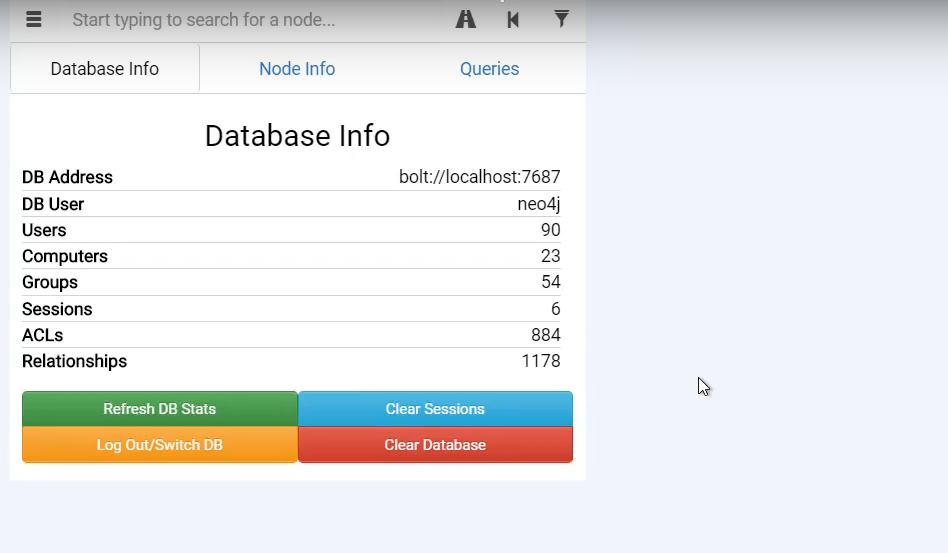
OPSEC Alert: Running collections method such as
LocalAdmin,RDP,DCOM,PSRemoteandLoggedOnwill allow SharpHound to enumerate every single computer in the domain.Collecting this information is useful to BloodHound and without it you may see fewer paths.
To use on LDAP queries we can use DcOnly collection method.
Raw queries
Executing raw queries is useful for finding nodes that have particular properties or to help specific attack paths.
- Query all users that have
Service Principal Name (SPN)set.
Do not require Kerberos preauthenticaion set.
* Query all computers that are AllowedToDelegate.
- Query all computers with
Unconstrained Delegation.
- Query all computers with
Constrained Delegation.
- Query all users with
Constrained Delegation.
- Query all Principals with GenericWrite over GPOs.
- Query ACL for a specify group:
- Query potential MS SQL Admins: