Non-Jailborken iOS
Non-jailbroken iOS Hacking
On a jailbroken device, you can run frida-server, which handles injection for you, even in encrypted apps. However, on a non-jailbroken device, we have to prepare the application manually. There are two approaches we can take:
- Install a debug version of the application and inject during application launch
- Repackage the application to include the Frida Gadget
Debug Version
Applications signed with the entitlement get_task_allow allow third party applications to run a function called task_for_pid() with the process ID of the initial application as argument in order to get the task port over it (be able to control it and access it’s memory).
However, this technique only works if the app binary isn't FairPlay-encrypted (i.e., if it was obtained from the App Store). The best option is to ask to the client to a decrypted version.
To abuse that we need to create our signing certificate and the provisioning profile in xcode. After that we can sign our IPA without with the flag get-task-allow in iOS App Signer.
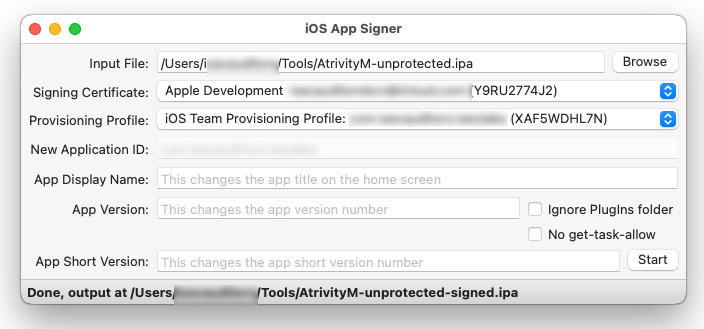
- https://github.com/DanTheMan827/ios-app-signer
Note: It's important to unmark the
No get-task-allowflag.
Once signed we can install it on our device with:
Once installed we need to store the frida gadget lib into our macOS.
wget https://github.com/frida/frida/releases/download/16.7.19/frida-gadget-16.7.19-ios-universal.dylib.gz
gzip -d frida-gadget-16.7.19-ios-universal.dylib.gz
mv frida-gadget-16.7.19-ios-universal.dylib /Users/USER/.cache/frida/gadget-ios.dylib
Finally use objection as usually does:
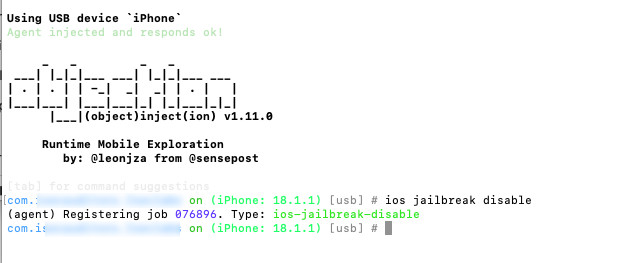
If we get a timeout and get a blackscreen we need to configure frida in order to resume the app at startup.
nano /Users/USER/.cache/frida/gadget-ios.config

{
  "interaction": {
    "type": "listen",
    "address": "127.0.0.1",
    "port": 27042,
    "on_load": "resume"
  }
}
Decrypt a FairPlay encripted IPA
From App Store
It's possible to obtain a decrypted IPA.
- Install the app in the non-jailbroken iPhone.
- Launch
Apple Configuratorinside your macos. - You should see your iOS device, double-click on it, and then click
Add + -> Appsfrom the top menu bar. - After clicking the apple configurator will downoad the IPA from Apple and will try to install it again. A prompt asking you to reinstall the app will pop up.
- The IPA will apear in
/Users/USER/Library/Group\\ Containers/K36BKF7T3D.group.com.apple.configurator/Library/Caches/Assets/TemporaryItems/MobileApps
Decrypting the app
To decrypt the IPA we need to isntall it on a jailbroken device. If the version is not supported to the old device we can modify the Info.plist with TextEdit.
Change the minimum supported version and zip it again.
If the plist is in binary format convert it to xml and after the changes turn back to binary.
Zip it:
Then, install it to the jailbroken device.
Note:
AppSync Unifiedfrom Cydia is needed to prevent anyinvalid signatureerrors.
Finally you can use Iridium to obtain the decrypted IPA.
Note: With
ipadecryptit's possible to download and decrypt it directly from appstore. There's no need to change the minimum version.